Central Digital Platform: How Suppliers Register and Get Bid-Ready
How to register on the Central Digital Platform, what supplier information you need, how share codes work and how to keep your record ready for every tender.
Since the Procurement Act 2023 went live on 24 February 2025, almost every public sector bid in England, Wales and Northern Ireland asks for something new: your Central Digital Platform details. If your team hasn't set up its record yet, or set it up in a rush and hasn't touched it since, this guide covers what the platform is, how to register and how to keep it in good shape.
What is the Central Digital Platform?
The Central Digital Platform (CDP) is the government's online service for public procurement, and it sits inside Find a Tender. It's where buyers publish their notices under the Procurement Act 2023, and it's where suppliers store the core business details that buyers would otherwise ask for in every tender. GOV.UK describes it as a place to register once, keep your information up to date and share it with buyers when you bid. It's free for everyone to use.
If you've read our Find a Tender guide, you'll know the notice side already. The supplier record is the part many teams overlook.
Why registration matters
Buyers running procurements under the Act will usually ask you to provide your CDP share code or a download of your supplier information as part of the tender. Without it, your bid can stall at the first hurdle.
Lower-value work is covered too. Since 1 April 2026, regulation 36A of the Procurement Regulations 2024 says that before a buyer publishes a contract details notice for a below-threshold contract, it must get confirmation that the winning supplier has registered on the platform, along with the supplier's unique identifier. For those contracts the required information is short: your name, postal and email addresses, and whether you're an SME or a value-driven voluntary organisation. Even if you only bid for smaller contracts, you'll need to be registered by the time you win one.
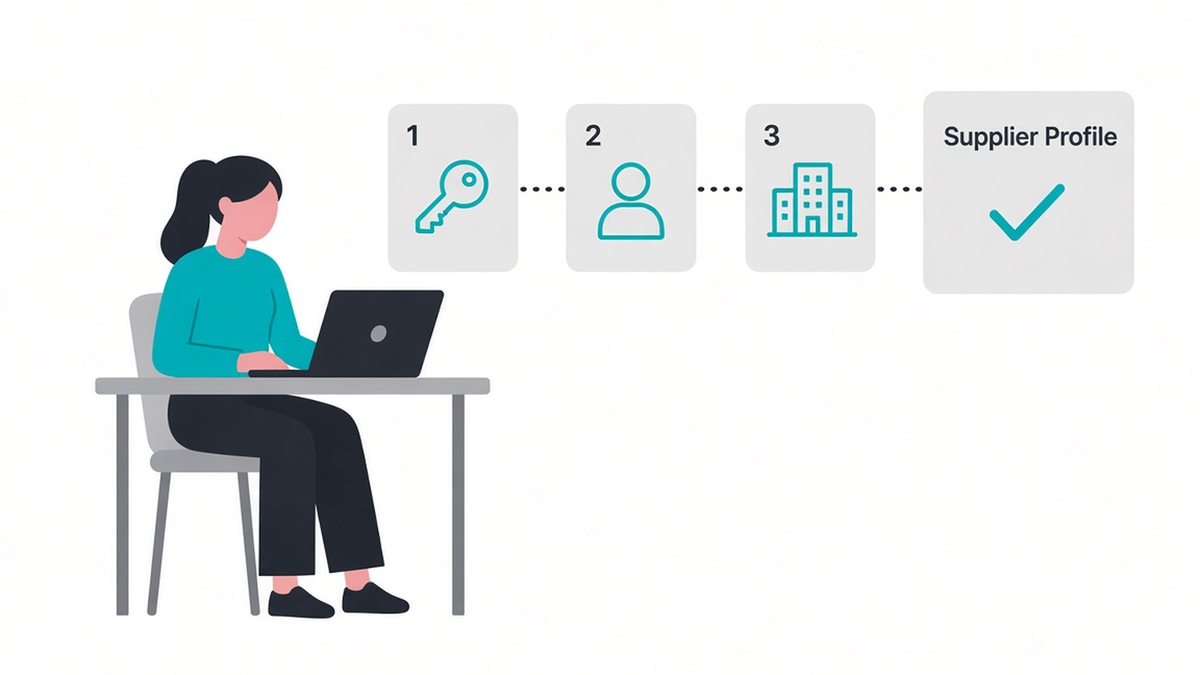
Registering in three steps
The process is the same for every organisation, and GOV.UK recommends that one person sets it up first as the administrator.
- Create a GOV.UK One Login. Use your individual work email, confirm the six-digit code and choose how you'll receive security codes.
- Register as a user of the platform. Agree to the privacy policy and enter your name.
- Register your organisation as a supplier. Have your Companies House number (or an equivalent such as a Charity Commission number) and your registered address to hand. If you don't have a registered number, the platform will give you a unique identifier.
The administrator can then add colleagues. There are three user roles: administrators manage users and all information, editors can change details, complete declarations and create share codes, and viewers can see the information and copy a share code into a tender form.
The supplier information you'll need
Registration on its own isn't enough for most tenders. You also need to complete your supplier information, which is split into six sections:
- Basic information, such as your name, address, Companies House and VAT numbers, and whether you're an SME, VCSE or public service mutual.
- Connected persons, meaning people or organisations with significant influence or control over the business.
- Qualifications relevant to the work you do.
- Trade assurances, such as accreditations.
- Exclusions, where you declare any mandatory or discretionary exclusion grounds that apply to you or your connected persons, as set out in Schedules 6 and 7 of the Act.
- Financial information, including your accounts from the most recent financial years.
The Cabinet Office factsheet is clear that nobody checks this data before you share it. Responsibility for accuracy sits with you, and due diligence sits with the buyer. Treat it with the same care you'd give a PSQ, because buyers will use it in much the same way. Our guide to the procurement specific questionnaire explains how the two fit together.
Share codes and keeping them current
Once your information is complete, you declare that it's accurate and create a share code. You then give the buyer that code in their tendering portal, or download your information as a file and send it the way the tender documents ask.
A share code is a snapshot of your record on the day you created it. If anything changes, such as a new director, new accounts or a lapsed certificate, you update the record and create a new code. The platform keeps a list of the codes you've made and when, which makes it easy to see whether the one in your bid template is out of date.
The Education Authority Northern Ireland guidance puts it plainly: suppliers are responsible for making sure everything they share, including exclusions information, is complete, accurate and up to date at the point they submit.

Who should own it?
In most bid teams the answer is the bid manager or bid coordinator, with finance and the company secretary supplying the details they own. A simple routine helps:
- Check the record at the start of every bid, not the night before submission.
- Set reminders for when accounts are filed and certificates renew.
- Create a fresh share code whenever something changes, and store it with your other standard bid content.
- Keep more than one administrator, so the record isn't locked to one person's login.
This is the same discipline that keeps a good content library useful. If your standard answers, policies and certificates already live in one place, keeping the CDP record in line with them is a short job rather than a scramble.
FAQs
Is the Central Digital Platform the same as Find a Tender?
Yes. GOV.UK refers to the Central Digital Platform as Find a Tender. The notice search you may already use and the supplier registration sit in the same service.
Does it cost anything?
No. The platform is free for buyers and suppliers.
Do I still have to answer the buyer's own questions?
Yes. The platform holds your core information, but each buyer sets its own tender questions and documents, and you still submit your bid in the way they ask.
Does a share code expire?
The guidance doesn't give an expiry date. It reflects your information when you created it, so create a new one whenever your details change.
Find the right opportunities to use it on
A complete CDP record makes you ready to bid. Finding the right opportunities is the next step. BidSearch checks more than 900 sources for UK public sector tenders, and the Knowledge Engine keeps your approved answers and evidence in one place so every response starts from your best material. Book a demo to see how it fits your team.
The BidScript Team
The whole team!