Find a Tender: How to Use the UK’s Central Tender Service
Find a Tender is now the single home for every UK public sector contract. Learn how to search, register, and set alerts so the right tenders come to you.
Find a Tender is the UK’s central platform for public sector contract opportunities — and since 24 February 2025 it is the single place every regulated government tender must be published. With around 14,800 UK searches a month for “find a tender”, knowing how to use it is essential for any supplier chasing public work. This guide covers what it is, what changed under the Procurement Act 2023, and how to search, register, and set alerts.
What Is Find a Tender?
Find a Tender (FTS) is the official UK government service for advertising and viewing public sector contracts. It is run by the Cabinet Office and is free to search, with no account needed to browse live opportunities. Contracting authorities — councils, NHS trusts, government departments — are legally required to publish their regulated notices there.
The web address is find-tender.service.gov.uk.
What Changed Under the Procurement Act 2023?
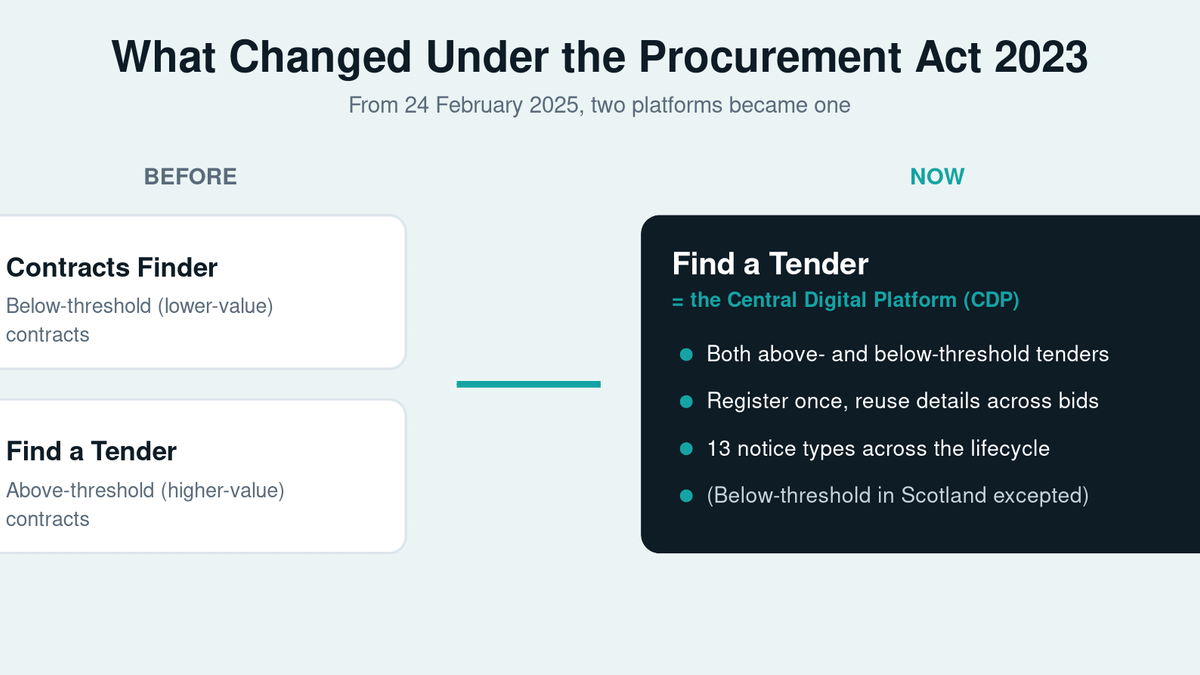
On 24 February 2025, Find a Tender became the Central Digital Platform (CDP) — an integrated system where noticing, sign-in, and supplier registration work together. Two changes matter most for suppliers:
- Single supplier registration — enter your core business details, financial standing, and certifications once, then reuse them across every bid instead of re-keying.
- 13 notice types — a structured set of 13 notice types now covers the full procurement lifecycle, including early planning notices that flag contracts before they go live.
How to Search Find a Tender
You can search without an account. To cut the noise fast:
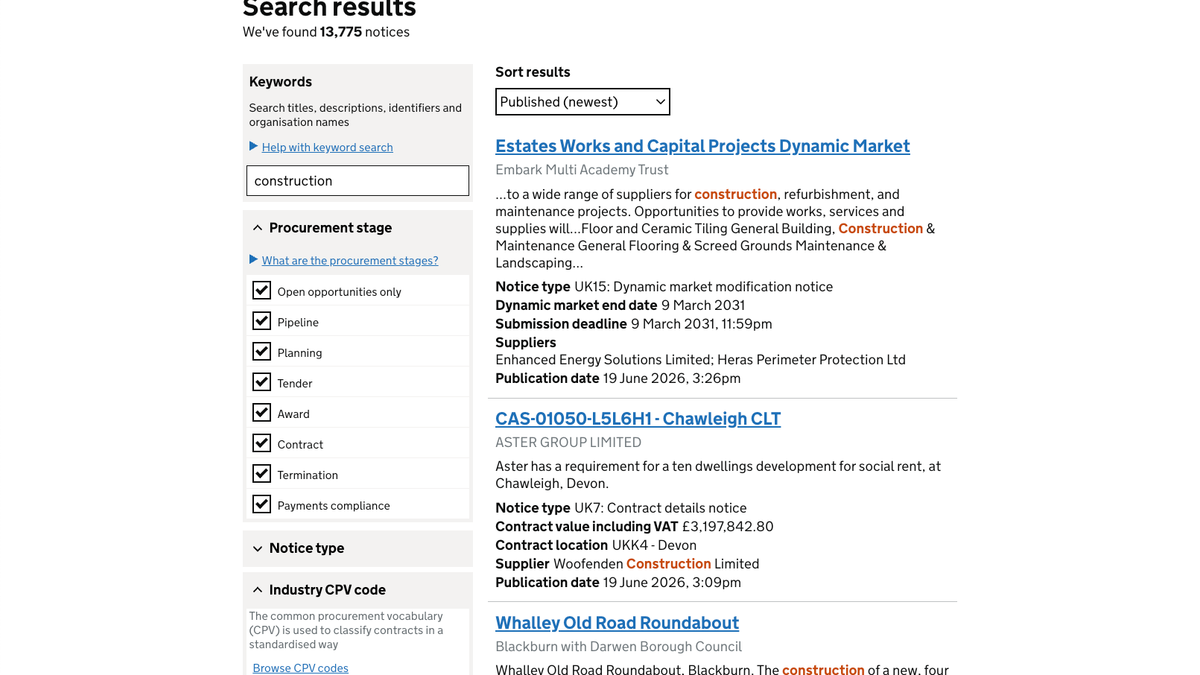
- Search by keyword — use the words a buyer would use, not your internal jargon.
- Filter by CPV code — CPV (Common Procurement Vocabulary) codes classify what is being bought; filtering on the two or three that match your services is the single most effective filter.
- Filter by status — open, planned, or awarded notices (awarded notices are useful for competitor research).
- Filter by location and value — narrow to regions and contract values you can realistically deliver.
How to Register and Set Alerts
To bid, register via the Supplier Registration Service linked from Find a Tender. Complete your core information once — company details, financial standing, certifications such as ISO 9001 or Cyber Essentials — and keep it current, as expired certificates and old accounts are a common cause of avoidable rejections.
Then save your best keyword-plus-CPV searches and subscribe to alerts, so new matching notices come to you instead of relying on manual daily checks.
► Want the right tenders found for you? BidScript’s BidSearch is an agentic search engine that automatically finds, filters, and recommends tenders matching your strengths — before competitors spot them. Book a demo.
Find a Tender vs Contracts Finder
For procurements starting on or after 24 February 2025, Find a Tender carries both above- and below-threshold UK opportunities (except below-threshold in Scotland) — making it your primary feed. Contracts Finder still carries some below-threshold information (contracts over £12,000 for central government, £30,000 for the wider public sector) and older notices, but it is no longer the main place to look.
Frequently Asked Questions
What is Find a Tender?
Find a Tender is the UK government’s central digital platform for public sector contract opportunities. Since the Procurement Act 2023 came into force on 24 February 2025, it is the single service where contracting authorities publish regulated notices and where suppliers register once and reuse their details. It is free to search.
Is Find a Tender free to use?
Yes. Searching and viewing opportunities is free and needs no account. You only register to bid and to use supplier features such as the single supplier registration, which lets you store and reuse your core business information across multiple tenders.
What is the difference between Find a Tender and Contracts Finder?
Historically Contracts Finder held lower-value contracts and Find a Tender held higher-value ones. For procurements from 24 February 2025, Find a Tender carries both above- and below-threshold UK opportunities (except below-threshold in Scotland). Contracts Finder still carries some below-threshold information and older notices, but Find a Tender is now the primary place to look.
How do I find relevant tenders quickly?
Use CPV codes that match your services, combined with keyword, region, and value filters. Save those refined searches and subscribe to alerts, so new matching notices are pushed to you automatically rather than relying on manual daily checks of the platform.
Make Find a Tender Work for You
Find a Tender is now the front door to UK public sector work. Register properly, build precise CPV-based saved searches, and have your response process ready, and you stop missing opportunities you could win.
► Book a BidScript demo to see how BidSearch surfaces the right tenders and helps your team respond faster, with current evidence.
Read Next
How to Find RFPs and ITTs in the UK: A Practical Guide for Bid Teams
Learn where to find RFPs and ITTs — and how to win them. This guide shows how bid teams discover the right tenders, access private opportunities, and focus on bids that actually convert.
What Is a Procurement Selection Questionnaire (PSQ)?
In December 2024, the UK Government rolled out the Procurement Specific Questionnaire (PSQ) — the new replacement for the old SQ under the Procurement Act 2023. This isn't just a mild update—it's a wholesale shift toward smarter, fairer, and more social-value-focused procurement.
What Is a Condition of Participation (CoP)? UK Procurement Act 2023 Guide
Ever seen a contract notice that feels like a quiz before you even write your bid? That's what they call a Condition of Participation (CoP)—and it matters, because if you don't tick those boxes, you don't even get to play.